Tickets, Guests & Co-op Teamwork Strategy
Match ticket Type and Visit requests, manage guest service, and divide park duties among your crew.
Guest Operations: Tickets, Gates, and Souvenirs
A dinosaur park needs paying visitors to thrive. Alongside dinosaur care, the official game description highlights selling tickets and souvenirs to guests as core daily tasks. During your shift, guests request tickets at the booth window.
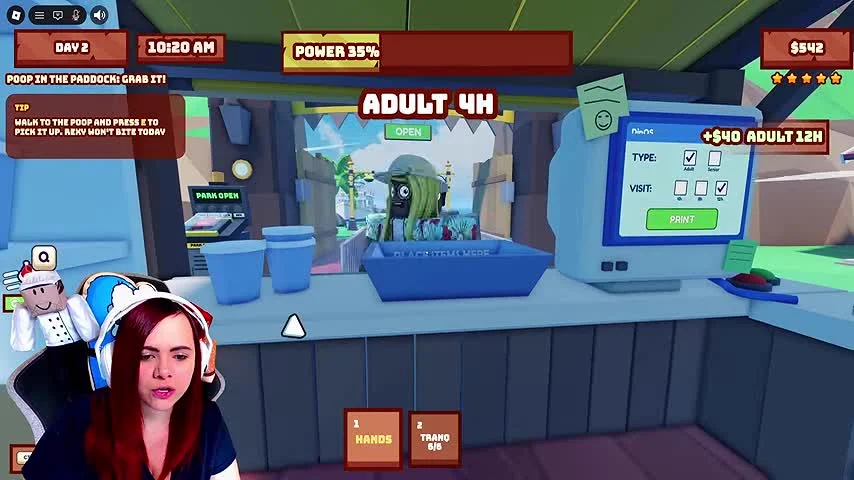
Before you can print a ticket, your prerequisite step is to walk inside the ticket booth, stand directly in front of the ticket machine terminal, and check the speech bubble above the waiting customer to read their exact order.
Concrete Steps: Matching Ticket Type and Visit Duration
The ticket machine terminal features two separate selection rows above a green PRINT button. The top row sets the customer TYPE (with buttons for Adult and Senior), while the middle row sets the VISIT duration (with buttons for 1H, 4H, and 12H). You must configure both settings to match the customer's speech bubble before printing.
In an inspected gameplay frame at the 8-minute mark, the customer at the window displays a request bubble reading ADULT 4H. Meanwhile, the ticket machine screen currently displays Adult and 12H selected. Because 12H does not match the requested 4H visit duration, pressing PRINT right away would not match the customer's order. Instead, follow this exact sequence:
- Read the customer speech bubble at the window (for example, ADULT 4H).
- Under TYPE on the machine, select the matching age category (Adult or Senior).
- Under VISIT on the machine, select the matching hour duration (1H, 4H, or 12H) so the dark monitor screen shows both matching selections.
- Press the green PRINT button only after both Type and Visit match the request.
Dividing Roles for Up to 4 Friends
The official description says you can team up with up to 4 friends. Agree who watches each station before the shift gets busy. The following roles are a suggested division of work based on the tasks shown in gameplay; they are not confirmed character classes or a statement of total server capacity.
| Recommended Role | Primary Duties | Emergency Backup Task |
|---|---|---|
| Paddock Caretaker | Throw meat over fences before dinos get hungry | Assist with tranquilizing escaped dinosaurs |
| Generator Engineer | Scoop paddock poop and insert biomass into the hatch | Monitor fence gate switches and power percentage |
| Guest Attendant | Operate the ticket machine (Type + Visit) and sell souvenirs | Respond to guest requests; inspect gate prompts carefully |
| Flex / Security Roamer | Deliver extra poop during low-power alerts and watch for escapes | Take over ticket printing when multiple guests queue |
Mistake Recovery and Unverified Economy Details
If you select the wrong Type or Visit button on the ticket machine, simply click the correct category or hour button on the terminal to update the preview screen before hitting PRINT. If an alarm pulls you away from the booth mid-order, secure the generator power first; the power warning can lead to fence loss, so return to the ticket request after dealing with the urgent fueling task.
Keep in mind that certain economic details are not confirmed in the official description or inspected frames: we do not have verified figures for exact ticket prices per hour tier, whether printing an incorrect ticket consumes supplies or penalizes Dino Coins, or how souvenir counter interactions are priced.